What if we made SIMA2 from Temu
At Frisson Labs, we want AI companions that are actually fun to play with. Playing the game is the first step. Before an agent can feel present, useful, or worth keeping around, it has to handle the basics of being in the world.
That means it has to:
- read the screen
- figure out what to do
- recover when it gets stuck
SIMA2 is the best public example for that direction: agents that learn from human play, act from screen observations, use keyboard/mouse controls, and use reasoning for longer-term goals.
We are a small lab, so we are not going to outspend Google on game-agent training. The part of SIMA2 we cared about was the shape: it looks at the screen, acts through keyboard/mouse controls, uses learned skills, reasons about goals, and improves from experience. We might not be able to copy the DeepMind training loop, but what if we built the "SIMA2 from Temu" in Roblox and saw what the cheap stack could teach us?
For our "Temu" SIMA2, we approximated:
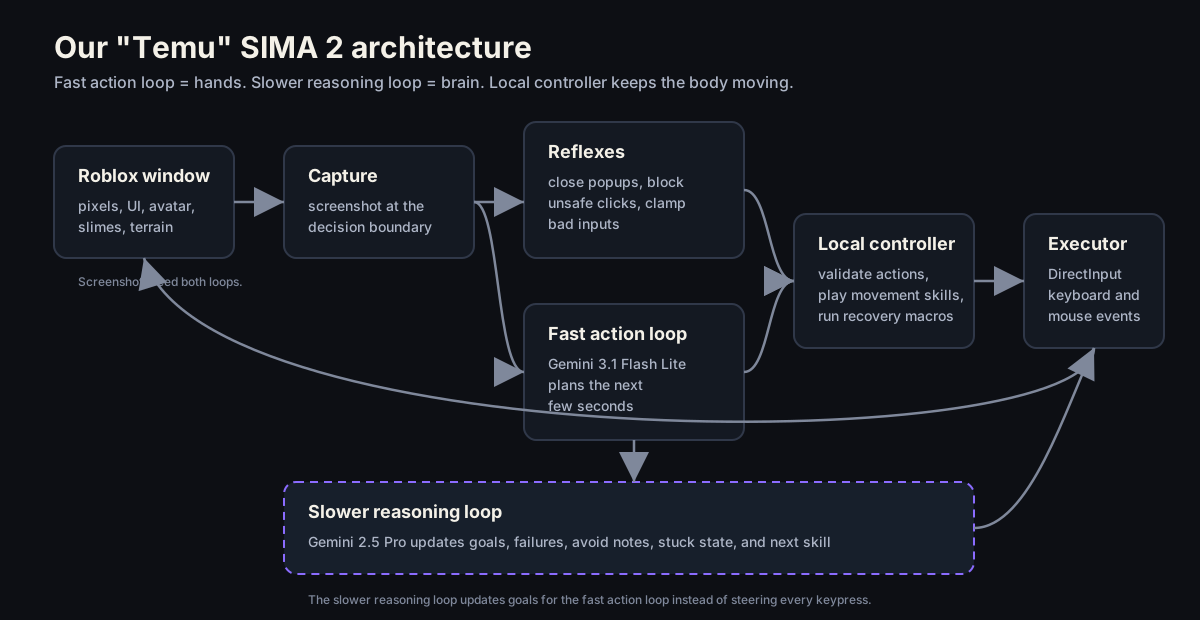
- Screen observations: Roblox screenshots fed into the fast action loop and slower reasoning loop
- Keyboard/mouse control: timed action sequences representing key presses and mouse movement
- Fast action loop: Gemini 3.1 Flash Lite planning the next few seconds
- Slower reasoning loop: Gemini 2.5 Pro updating goals and failures, then directing the fast action loop
- Learned skills: named behaviors like
explore_open_pathandrecover_if_stuck - Learning loop: a recording overlay showing the plan, action batch, and actual keys, so each run could teach us what to patch next
The game and the run
I picked Slime RNG because it was trending on Roblox and the gameplay was idiot-proof. You click the roll button, the game AFK farms for you, and eventually you unlock the next area. It came with training wheels, so I figured it would be a good place to start. That made the agent's job pretty easy on paper: ignore the gate it could not afford, find slimes or coins, and keep moving.
In this run, the Canyon gate cost 216M coins and the agent had 21.7M. It did some real player-ish things: rolled a slime, avoided the gate, and even bunny-hopped around like a person at a keyboard. Then a lot of the run became the actual problem: it kept drifting the wrong way, getting pinned, and trying to walk through a tree.
We used ffmpeg to record our sessions and add debug logs over the video: what the slower reasoning loop wanted, what the fast action loop chose, which keys fired, and where the body walked into the tree anyway. For this run, the details are below.
We also did the least scientific evaluation possible: watched replays as a team and argued about how human the movement felt. There is no clean razor here. "Looks like a player" is a mix of timing, intent, hesitation, recovery, and weird keyboard habits people do without noticing. P.S. we liked the bunny hops.
Where we started
The first version was painfully literal:
screenshot -> Gemini 3.1 Flash Lite -> one keyboard command -> local executor -> next screenshot
It technically worked, but the avatar's movement looked awful: the loop would look at the screen, wait around three seconds, press a key, then wait for the next move. So we asked Gemini for a three-second action sequence instead of a single keypress, which let the avatar keep moving while the next request ran.
{
  "sequence_id": "move_to_path",
  "ttl_ms": 4000,
  "interruptible": true,
  "actions": [
    { "type": "key_hold", "key": "w", "start_ms": 0, "duration_ms": 3000 },
    { "type": "key_hold", "key": "d", "start_ms": 100, "duration_ms": 900 },
    { "type": "key_tap", "key": "space", "start_ms": 1800, "duration_ms": 140 }
  ]
}
That small change helped a lot in our vibe evals. Continuous movement made the avatar feel more player-like, but the movement was still obviously bot-like.
Making movement feel natural
Prompting the model to "move like a human" was basically useless. It gave us clean movement, and clean movement looks fake. People playing Roblox are constantly doing dumb little keyboard things: feathering A/D, jumping too much, overcorrecting, holding W while they think.
So we just recorded ourselves playing and turned the raw key down/up events into reusable movement skills:
human_forward_left_jump_chain_zigzag_00human_forward_left_jump_chain_zigzag_01human_forward_right_jump_chain_zigzag_02
Gemini picked the kind of movement it wanted, and the local executor handled the timing. The movement skills looked way more player-ish than the sequences Gemini made from scratch.
Building a brain to get unstuck
The movement got better, but the agent still kept finding walls. It would run into a tree, portal frame, or some other chunky Roblox geometry, then keep pressing forward because the screenshot still had something interesting in view.
That is the wall problem: from pixels alone, "there is a path ahead" and "my body is pinned" can look weirdly similar. Gemini 3.1 Flash Lite could pick the next few seconds, but it needed a longer brain to remember what it had just hit, what direction failed, and whether recovery actually worked.
So we split the system into two loops.
Fast action loop (the hands): powered by Gemini 3.1 Flash Lite. It sees the last few screenshots and emits the next few seconds of action: move, jump, turn, recover.
Slower reasoning loop (the brain): powered by Gemini 2.5 Pro. It wakes up every few batches, reads a short run log plus several screenshots, and sets the goal the fast action loop should play from:
{
  "current_goal": "make progress in the slime game",
  "subgoal": "collect coins before trying the expensive gate",
  "next_intent": "move around the open area to find coins or interactable slimes",
  "preferred_skill": "explore_open_path",
  "recovery_skill": "recover_if_stuck",
  "recent_failures": ["walked into tree trunk"],
  "avoid": ["do not go back into the blocked portal wall"],
  "stuck_counter": 2
}
Gemini 2.5 Pro did not make the avatar faster. In the latest run its three strategy calls took 13.2s, 20.2s, and 16.6s, which is useless for steering a jump. But it gave the fast loop better context:
- Move around the open area; the Canyon gate costs
216Mcoins and we only have21.7M. - Approach the targeted slime to defeat it and collect coins.
- Back away from the tree trunk blocking the view and turn toward open ground.
This became the Temu SIMA2 stack we actually used: a fast loop for movement, a slower loop for intent, local code for timing and safety, recorded movement skills for body feel, and recovery code for the places where the model kept embarrassing itself.
The Human Patch Loop
The slower reasoning loop helped the agent notice the wall and ask for recovery. Getting out still came down to a hardcoded camera turn I added because it kept getting pinned in trees and walls.
We tried three versions of escaping:
- Ask the model nicely: tell Gemini to use
recover_if_stuck. It helped once, then went back to polite little taps. - Make recovery a skill: use keyboard commands to turn around, jump, and walk forward.
- Allow camera turns again: we had disabled longer camera turns because the agent kept doing full 360s like an idiot. Recovery needed an exception, so
recover_if_stuckgot permission to hold the right arrow for a couple seconds.
It was funny that even with the slower reasoning loop noticing the problem, we still had to patch in a hardcoded recovery skill because the model kept making the same low-level mistake.
Reflexes showed up for the same reason. The agent kept trying to add people, open messages, and click things that cost Robux, so the controller had to close popups, block unsafe clicks, and clamp down on "bad" actions before Gemini got a vote.
At this point, calling this "an LLM playing Roblox" felt too generous. It was almost like an LLM-blended behavior tree: local skills and reflexes did the reliable stuff, while Gemini got plugged into the confusing parts.
SIMA2 had self-learning. Our learning loop was watching replays together, finding the dumb part, patching it, and running it again.
What happens next?
The system does not know which terrain is traversable, which objects are enemies, which gates are affordable, or whether the last recovery actually changed position. It has screenshots and logs, but it does not know where it is.
The gap we need to close is the difference between, "I hit a tree trunk. Back away and turn toward open ground," and, "This tree trunk is northwest of spawn, the slime target is behind me, the Canyon gate is too expensive, and the best next action is to farm coins in the open area for thirty seconds."
Here are my takeaways from this run.
The cheap stack could produce glimmers of human-like play, but only after we wrapped it in a lot of human help: timed actions, recorded movement, local reflexes, and patches from replay review.
The model could read the screen and make reasonable short-term guesses, but it did not really understand the game. And even when it understood pieces of the game, it was slow and played worse than my 4-year-old nephew.
If we were just trying to make the next run better, I would add the incremental pieces first:
- Progress signal: did the avatar actually move, or are we still pressed against the same tree?
- Blocked-direction memory: if recovery just failed on this wall, do not try the same direction again.
- Tiny affordance map: gates, buttons, enemies, pickups, open ground, obvious walls.
- Learned movement selector: pick movement skills based on actual context instead of something close to RNG.
- Replay overlay: keep showing what the planner thought, what keys fired, and where the run fell apart.
That would make the behavior tree less dumb. It would not change the class of system we were building.
If we wanted a real jump, we would stop treating the world model as a note in the prompt and start building one directly: JEPA-style / latent-world models that learn what changed, what is blocked, what matters, and what is likely to happen after the next action.
Coming soon™, in a later post.
Notes
- Prototype: Gemini 3.1 Flash Lite screenshots plus function-called keyboard/mouse batches.
- Strategy mode: Gemini 2.5 Pro writes a slower intent card for Flash.
- Latest recording: annotated run on YouTube.
- Latest event log: events.json.
- Human movement examples came from local keyboard traces recorded during the prototype run.
- Related Frisson context: Frisson Labs, AI Gaming Voice Models, Ranked, and Grafting a Speech Head onto Gemma 4 E4B.